50 Design Icons: A Toolkit for Visual Storytelling
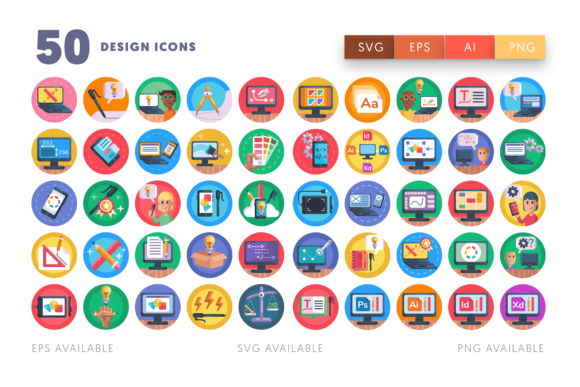
As designers, we often get lost in the abstract—the kerning of a headline, the weight of a sans serif font, or the hierarchy of a layout. But when it comes to representing the act of design itself, words sometimes fail us. How do you visually explain "programming," "Adobe Illustrator," or "digital sketching" without using a clunky text description? This is exactly the problem the 50 Design Icons set was built to solve. It is less of a traditional font and more of a comprehensive visual language, bridging the gap between complex software concepts and clean, understandable graphics.
The Anatomy of a Modern Design Language
At first glance, this collection feels incredibly tactile. It doesn't rely on the overly rounded, "friendly" aesthetic that plagues so many generic icon packs. Instead, the 50 Design Icons set leans into a slightly more technical, professional aesthetic while maintaining a warm, hand-drawn edge. You will find a distinct personality here—one that respects the tools of the trade. From the precise geometry of a color wheel to the sleek curves of an iPhone mockup, every asset feels intentional.
The visual consistency is the real hero here. Whether you are using the Adobe Photoshop icon or the coding symbol, they share a unified stroke weight and visual density. This isn't just a random collection of SVGs thrown together; it is a cohesive design system. The style bridges the gap between modern typography and illustrative art. It captures the essence of the tools—be it a drawing tablet, a desktop computer, or HTML coding symbols—without getting bogged down in photorealistic detail. This allows the icons to scale beautifully, maintaining their integrity whether they are used as a tiny favicon or blown up for a poster.
Real-World Applications: Beyond the Portfolio
When we talk about design assets, the conversation usually revolves around logo design or brand identity. However, the utility of this specific set extends far beyond just making a logo look pretty. For the marketer or content creator, these icons are functional storytelling devices.
Imagine you are building a landing page for a new SaaS product or a creative course. You need to explain features like "Cross-Platform Compatibility" or "Advanced Editing Tools." Instead of using generic stock photography, you can drop in the MacBook, Laptop, or Drawing Pen icons. They instantly communicate "tech" and "creativity" without distracting from your sales copy. This is where the set shines in web design—it aids in visual hierarchy, guiding the user's eye to key features without overwhelming them with text.
For the small business owner or blogger, the value lies in the versatility of the file formats. You aren't just getting a static image. You receive 50 SVG files and 50 EPS files, meaning these are true vectors. If you are putting together a presentation for a client, you can easily change the color of the Adobe Illustrator icon to match their corporate palette in seconds. If you are designing a t-shirt for a maker space, the programming and coder icons are ready for high-resolution printing. This flexibility makes it a premium font alternative for visual communication.
Technical Flexibility for the Modern Creator
One of the biggest hurdles in digital design is file compatibility. There is nothing more frustrating than buying an asset only to find it doesn't open in your preferred software. The 50 Design Icons set eliminates this friction. By providing an AI file, EPS file, and SVG file, it ensures that whether you are a die-hard Adobe user working in InDesign or an open-source advocate using Inkscape or Sketch, you have full control.
This level of customization is crucial for packaging design and editorial design. If you are writing a magazine article about the "Best Tools for Graphic Designers," you can use the Adobe Suite icons to break up the text. Because the files are vector-based, you can manipulate individual anchor points. You could take the ruler icon and extend it to create a custom divider line for a layout, or combine the laptop and color palettes icons to create a unique composite illustration.
Furthermore, the inclusion of 512 x 512 px PNG files makes this set incredibly accessible for social media managers. We know that time is money. If you are creating a quick Instagram story or a Pinterest pin about "Design Tips," you don't want to spend 20 minutes in Illustrator exporting assets. You can drag and drop the iPhone or Fonts icon directly into Canva or your editing software, resize it to fit, and you are ready to post.
Elevating Brand Identity and Professionalism
Consistency is the cornerstone of a strong brand identity. Using generic, mismatched icons is a subtle but significant way to erode trust. It signals a lack of attention to detail. By utilizing a unified set like the 50 Design Icons, you create a polished, professional environment for your audience.
Think about the user experience (UX). When a user visits a website, they scan for visual cues. A consistent set of icons for "Settings," "User Profile," or "Tools" reduces cognitive load. It makes your platform feel intuitive. This set includes specific symbols for Adobe User Experience and Computer Settings, which are perfect for UI designers looking to mock up interfaces quickly.
For entrepreneurs and hobbyists selling on platforms like Etsy or Creative Market, these icons can serve as the visual glue for your shop. You can use the crafting and drawing tablet motifs to decorate your shop banner, your thank-you cards, and your product packaging. It creates a subconscious connection between all your touchpoints. When a customer sees that specific style of iconography, they immediately recognize your brand.
Practical Integration and Final Thoughts
How do you get started? My advice is to audit your current projects. Where are you relying on text to explain something visual? Where are your interfaces feeling a bit sterile or cold?
If you are a web designer, try replacing your text-based feature lists with these icons. If you are a publisher, use them to illustrate technical concepts in your next ebook. The Adobe Premier Pro and Adobe InDesign icons are perfect for tutorial thumbnails, instantly signaling to the viewer exactly which software skill will be taught.
Ultimately, the 50 Design Icons set is about empowerment. It gives you the building blocks to communicate complex ideas simply and beautifully. It respects the tools we use every day—the pencils, the tablets, the code—and turns them into assets that work for you. Whether you are refining a creative font pairing for a poster or building a robust commercial font library for your agency, having a high-quality icon set like this in your toolkit isn't just a luxury; it's a necessity for staying competitive in a visual world.