Champeden: A Versatile School Presentation Template for Impactful Slides
Creating a presentation that captures attention and communicates clearly is a common challenge. Whether you're pitching a business idea, showcasing a portfolio, or delivering a school lecture, the foundation of your visual communication matters. The Presentation Template - Champeden by Jowo Creative Project offers a structured yet flexible starting point designed to meet these diverse needs. This template isn't just a collection of slides; it's a toolkit for building professional narratives with visual consistency.
Understanding the Visual Character of Champeden
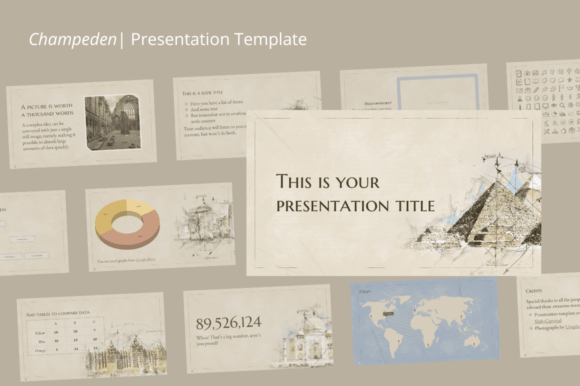
At its core, the Champeden template presents a clean, modern aesthetic. It avoids overly ornate or distracting design elements, focusing instead on clear typography and balanced layouts. The visual personality is professional and adaptable, making it suitable for contexts ranging from a corporate boardroom to a creative agency pitch or a classroom setting. The style leans towards contemporary modern typography, ensuring your content feels current and accessible.
The template's appeal lies in its neutrality and potential for customization. It provides a solid visual framework—consistent margins, alignment guides, and color schemes—that you can easily modify. The included graphics, shapes, and icons are designed to be resizable and customizable, allowing you to infuse your own brand colors or stylistic preferences without breaking the overall design harmony. This makes it a practical design asset for those who need a polished look without starting from scratch.
Where This Template Shines: Practical Applications
The true strength of the Presentation Template - Champeden is its multi-purpose nature. Here’s how it can be applied effectively across different projects:
- Business and Corporate Use: Perfect for quarterly reports, internal training, or investor pitches. The clean structure helps maintain a professional tone and supports a clear visual hierarchy, guiding your audience through data and key messages.
- Portfolio and Creative Agency Presentations: The minimal design acts as a neutral gallery wall, allowing your work—be it photography, design projects, or case studies—to take center stage. The easy drag-and-drop image insertion is particularly useful here.
- School and Educational Settings: As noted, this is a core use case. The template's clarity enhances readability, which is crucial for learning environments. Teachers and students can modify charts and text easily to fit specific lesson plans or research presentations.
- Company Profiles and Marketing: For startups or established businesses creating a company overview, Champeden provides the structure to articulate mission, services, and team information cohesively, reinforcing brand identity.
Think of it as a versatile canvas. A marketing team could use the same base template for both a social media strategy deck and a product launch presentation, simply by swapping out colors, images, and specific content. This consistency across different internal and external documents strengthens brand recognition and professionalism.
Key Features That Drive Usability
Beyond its visual style, the functional features of the Champeden template are what make it a time-saving resource:
- 28 Total Slides: Offers ample variety for different content types—from title slides and section breaks to data-driven charts and image-focused layouts.
- 16:9 Aspect Ratio: The standard widescreen format, optimized for modern displays and projectors.
- Full Customization: Every element—graphics, shapes, fonts, and colors—can be resized and changed. This is essential for aligning the presentation with existing brand guidelines.
- One-Click Image Insertion: Streamlines the process of adding your own visuals, a significant practical benefit for busy professionals.
- Drag and Drop & Easy Editing: Lowers the technical barrier, making it accessible even for those with limited design software experience.
The inclusion of a documentation file and icon vectors adds further value, providing guidance and additional design assets to enhance your slides.
Making the Most of Your Template: Practical Guidance
To leverage the Champeden template effectively, consider these practical steps:
- Evaluate the Fit: Before committing, review the slide masters and layouts. Does the structure support the story you need to tell? For a data-heavy presentation, check if the chart layouts are sufficient. For a visual portfolio, ensure there are enough full-image slides.
- Customize for Brand Consistency: Immediately replace the default color palette with your brand's colors. Update the fonts to match your brand identity—whether that involves a serif font for tradition, a sans serif font for modernity, or a script font for elegance. Consistency in these elements across all your materials builds recognition.
- Test Readability and Hierarchy: After adding your content, step back and review. Is the most important information the most prominent? Is there enough contrast between text and background? The template's clean design should aid this, but always verify with your specific content.
- Leverage the Included Assets: Use the icon vectors to add visual cues that break up text and aid comprehension. The documentation can help you unlock advanced customization features you might otherwise overlook.
Remember, a template is a starting point. The Presentation Template - Champeden provides the professional scaffolding, but your unique content, strategic messaging, and thoughtful customization are what will make the final presentation truly resonate with your audience. It’s a practical tool designed to save time and elevate the visual quality of your communication projects.